Aspro2 Documentation

ASPRO2 - How to prepare VLTI's GRAVITY or MATISSE observations with new GPAO ?
Date: Jan 2026
Authors:
- Laurent BOURGES — JMMC / OSUG
[!NOTE] Documentation updates in progress
Description
This document will show main steps as a tutorial to prepare VLTI observations with the instruments:
- GRAVITY (Science and Fringe Tracker in K band)
- MATISSE (Science target) associated to GRA4MAT (GRAVITY Fringe Tracker in K band).
Both relies on the fact that GRAVITY FT can perform dual field (1 object for SCIENCE channel, 1 another object for FT channel) within 30 to 60 arcsecs.
Since end 2025, VLTI's UT telescopes use the Gravity+ adaptive optics (GPAO) able to correct the atmosphere turbulence at high speed (1khz) based on new Wave Front Sensors (WFS) in the VISible (using the G_rp band = GAIA red filter ~ R) or IR bands (former CIAO detector) working in 2 modes:
- Natural Guide Star (NGS) if G_rp < 12.5 mag
- Laser Guide Star (LGS) for high-order correction + NGS (tip-tilt correction) star up to G_rp < 17 mag
Since ASPRO2 25.09, such observations can be modelled using up to 3 targets (1 for SCIence, 1 for FT, 1 for AO) that should remain in the telescope FOV (max ~50 arsecs).
See the JMMC Release page to see the complete list of JMMC tools (and get ASPRO2) !
[!NOTE] to get missing fluxes, you can query either SIMBAD or JMMC's GetStar service to retrieve Gaia, 2MASS & all-Wise fluxes (as ASPRO2's star resolver) or open the GetStar page using the 'GetStar' button.
Acknowledgement
If this software was helpful in your research, please add this sentence in the acknowledgement section of your articles, as it will support further development of new tools for interferometry:
    This research has made use of the Jean-Marie Mariotti Center
    \texttt{Aspro2} service \footnote{Available at http://www.jmmc.fr/aspro}.
How to prepare GRAVITY + GPAO observations ?
-
Open ASPRO2, select VLTI Period 117 (current in Jan 2026) offering both GRAVITY & MATISSE instruments.
-
Add your targets (1 science, 1 ft, 1 ao) i.e. 2 or 3 targets are needed depending if AO = FT target (satisfaying both G_rp < 12.5 and K < 12 limits) close enough to your science target (within 30 to 60 arcsecs.)
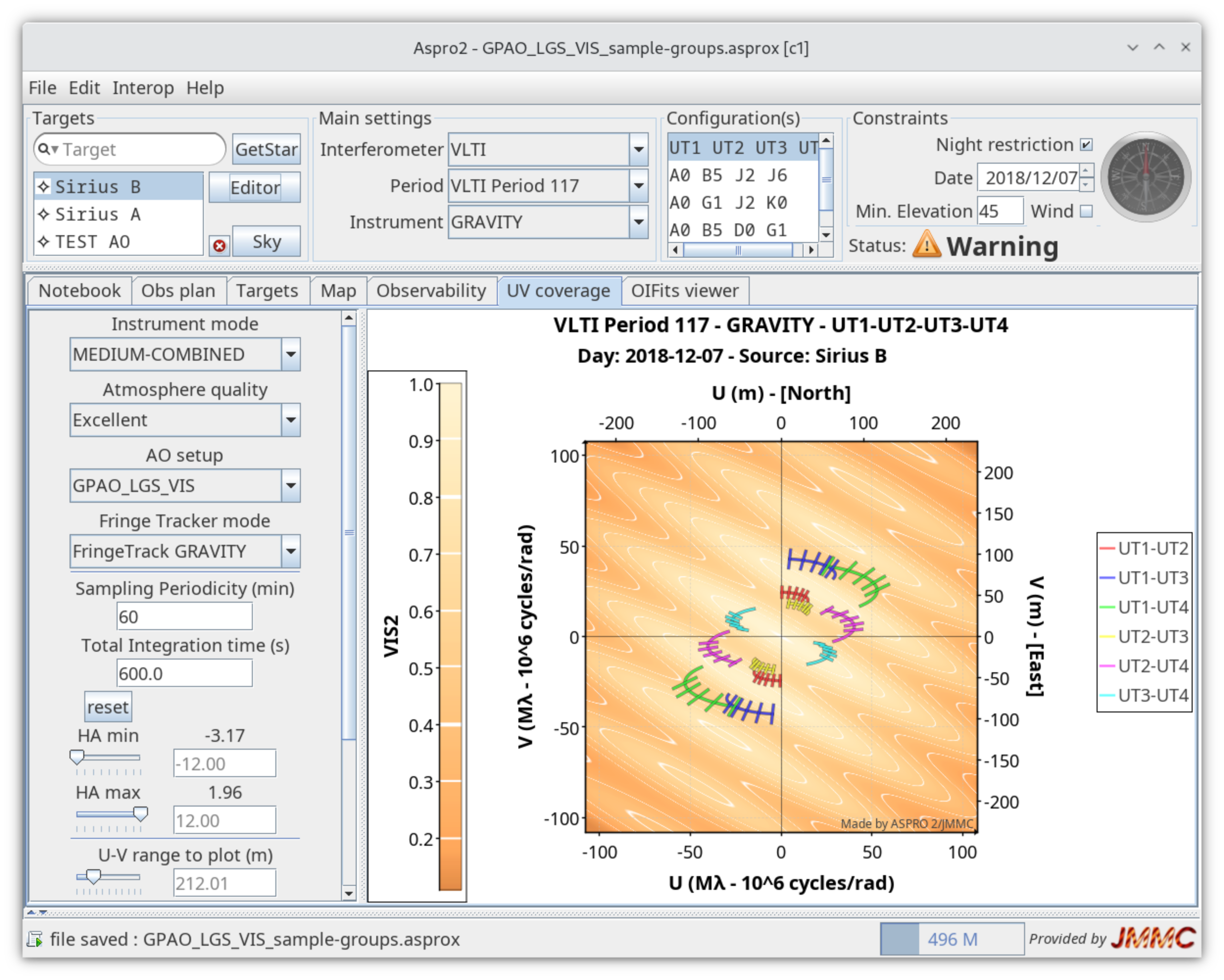
See the GPAO_LGS_VIS_GRAV_1_groups.asprox file
In this example, alf Cma A and B were used but their magnitudes were modified to test the scenario:
- 'SCI_alf_CMa_B': 1 faint science target with G_rp = 25 (impossible to use as AO target) and K = 17 (impossible to use as FT target)
- 'FT_alf_CMa_A': 1 target for the fringe tracker with (K = 10)
- 'AO_star': the target for GPAO NGS with G_rp = 13 (LGS needed)
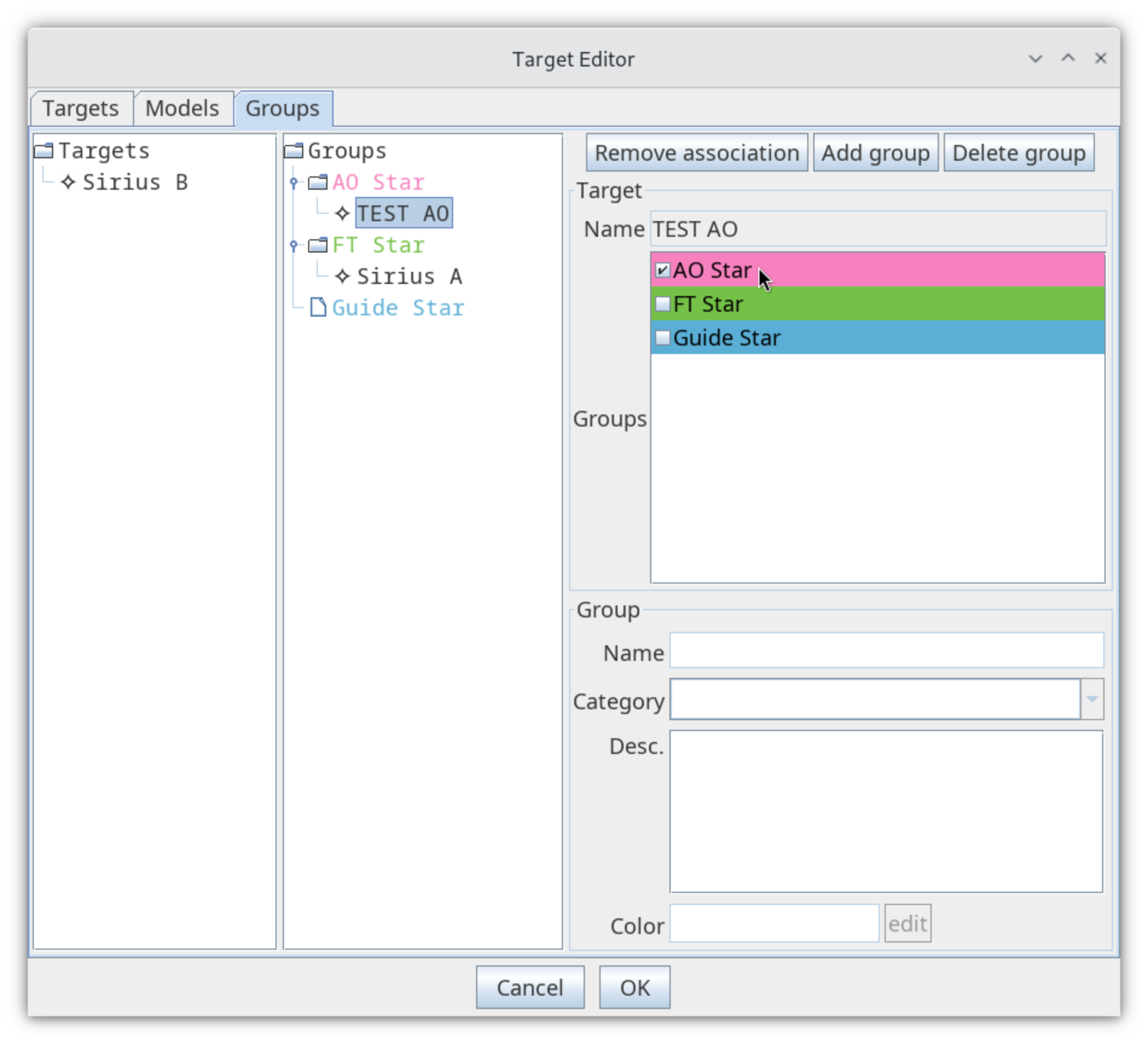
- Open the target editor to flag your FT / AO targets in their proper groups: Select the FT target and click on the 'FT star' checkbox (right side) to flag as a potential FT target; idem for the AO target in the 'AO star' group.
- Make then the association between the AO / FT targets and the science target: Select the FT target in the FT group (middle side) then drag & drop to your science target:
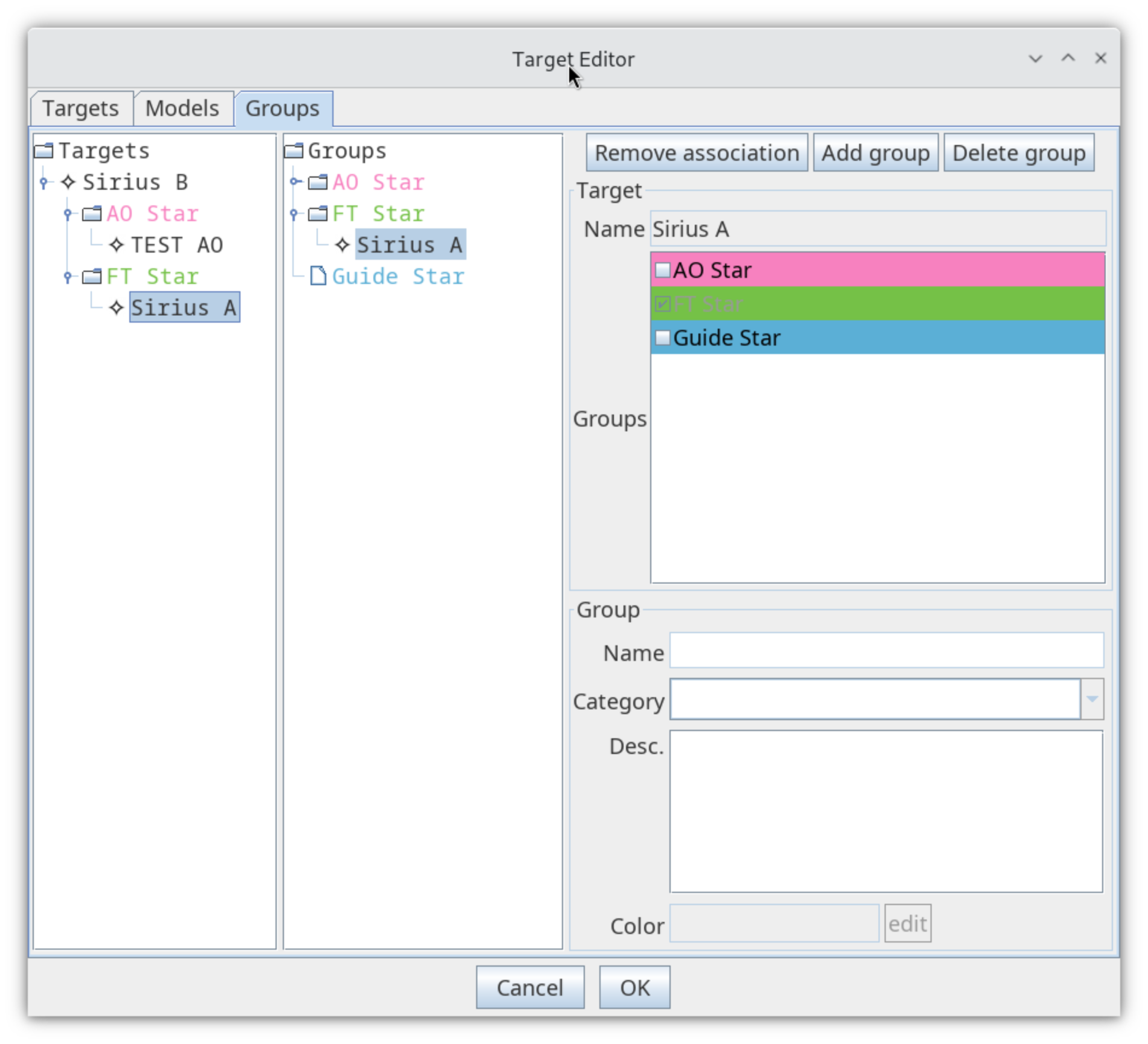
Use the button 'delete association' to remove a wrong one then use again drag & drop to make other associations.
- Verify fluxes of your targets in the target editor: GRAVITY requires K band flux, GPAO G_rp (or R / V) fluxes ...
Then close the editor using the 'OK' button.
- Select your science target and refine the observation setup in the UV coverage tab: Please select the instrument mode (spectral resolution like LOW, MEDIUM, HIGH ...), the AO setup (GPAO NGS / LGS, VIS or IR band), the atmosphere quality (Excellent, Good or average) and finally AO/FT stars (or the SCIENCE target) in the corresponding drop-down lists:
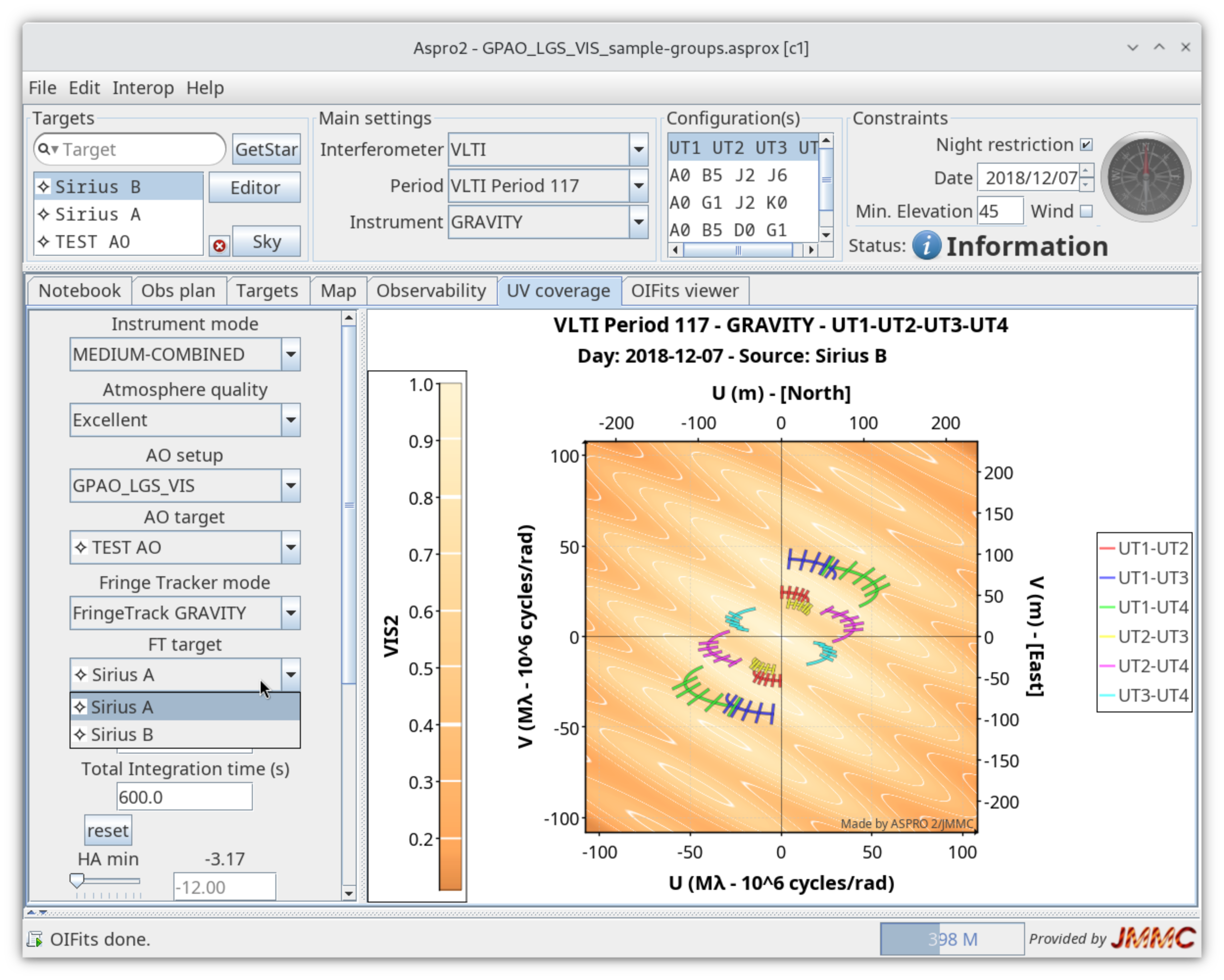
- Run model + noise simultations: Once ASPRO2 has a model for your Science target and is observable, it will compute a simulated dataset (OIFITS format) with noise & error modeling.
Please check the observation Status (Warning or Information) that shows the detailed setup (AO / FT/ SCI targets) with distances (arcsec, used fluxes) and SNR statistics on both FT and SCI exposures.
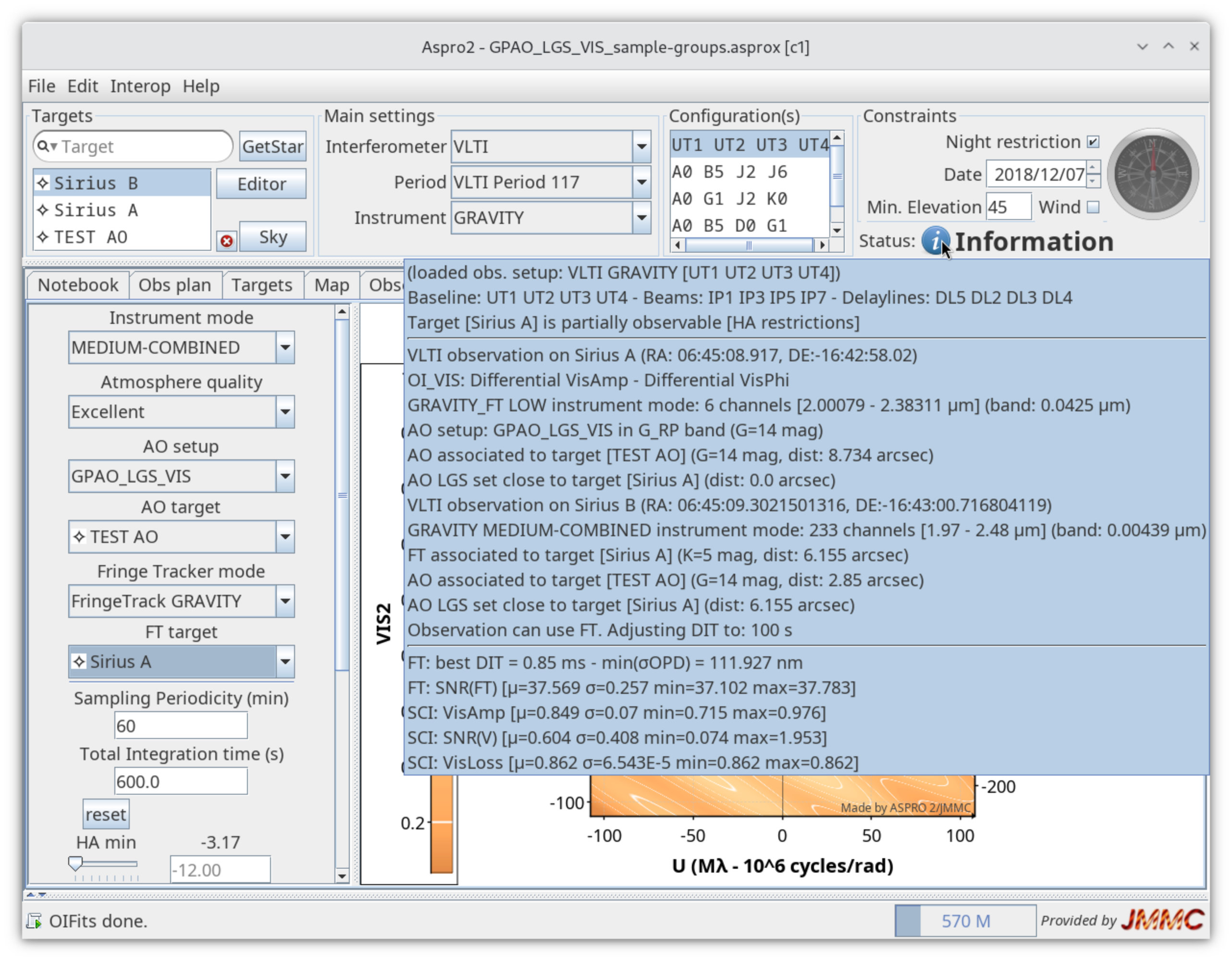
Enjoy ASPRO2 to prepare your GRAVITY dual observations !
Sample files
Here are observation files that can be loaded in ASPRO 2 for demonstration purposes:
- GPAO_LGS_VIS_GRAV_1_groups.asprox: GRAVITY observation file (groups)
- GPAO_LGS_VIS_GRAV_2_associations.asprox: GRAVITY observation file (groups + FT/AO associations)
- GPAO_LGS_VIS_GRA4MAT.asprox: MATISSE GRA4MAT observation file (groups + FT/AO associations)